Out of balance by one account's balance: an account with no grouping
Your trial balance is balanced, but the financial statements print "out of balance" by an amount that is exactly one account's balance? That account has no grouping: it's filed nowhere on the financial statements. It typically happens after a trial balance import, when an account was added during the year. The fix takes seconds.
The symptom
The trial balance is balanced (difference of 0.00), yet:
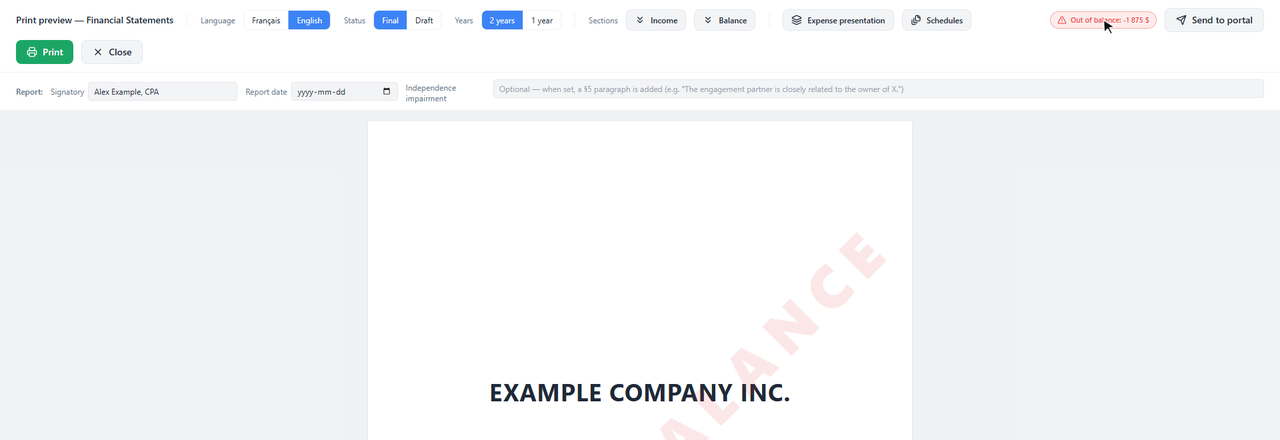
The badge and the watermark keep you from handing the client financial statements that don't balance without noticing.
Why
The financial statements are built from the groupings: each account is filed according to its code (for example 718, Travel expenses). An account with no code is filed nowhere. If it's an expense, it's missing from the income statement: net income is too high by the same amount, and the balance sheet is off by as much.
The Groupings page flags it: the "Orphan accounts" card counts the accounts without a valid grouping, and the account in question shows at the very bottom of the page, in the "Validation" section.
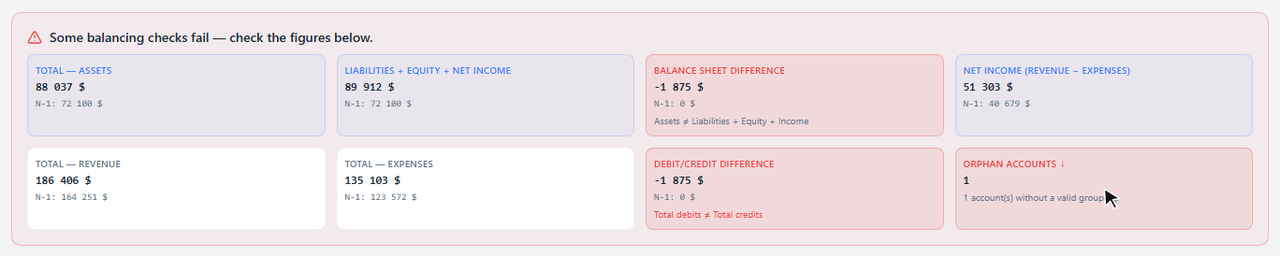
The balance sheet difference equals the forgotten account's balance (1 875 $), and the "Orphan accounts" card counts one.
A code missing from the catalog, a typo for example, doesn't file the account either: it also shows in the Validation section.
The fix
Open the Groupings
In the engagement, left menu: Groupings (by group & GIFI).
Go to the Validation section
Click the "Orphan accounts" card: the page scrolls down to the Validation section, which lists the account.

Type the grouping code in the account's box
Here 718, Travel expenses, then Enter. As you type, the box suggests the catalog codes with their names. The account joins its section (here administrative expenses) and the Validation section disappears.
All balancing checks pass and, when printed, the balance sheet balances.
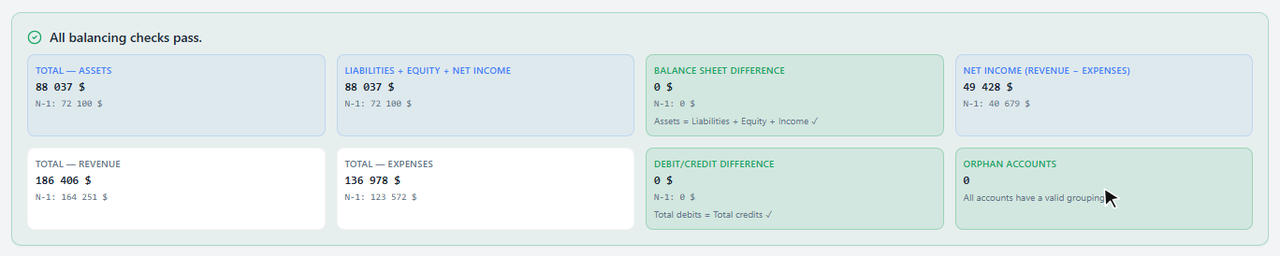
You can also pick the code in the trial balance, in the account's Grouping column.
What it changes
- The code is saved on the account, in this engagement.
- When you roll forward, the account keeps its code: next year, it's already filed.
- No balance changes: not the trial balance, not the client's books, not QuickBooks.
Frequently asked questions
How do I keep it from happening again?
After every trial balance import (Excel or QuickBooks), take a look at the "Orphan accounts" card in the Groupings. At 0, every account is filed.
Which code should I pick?
The one for the line where the account should appear on the financial statements: a travel expense account goes with travel expenses (718). The Groupings search finds a code by its number or its name.
The difference doesn't match any account's balance?
Several accounts may have no grouping: the difference is then their total, and the "Orphan accounts" card tells you how many. A difference of one or two dollars, on the other hand, usually comes from rounding: see Out of balance by one dollar: it's rounding.